Chapter Map Log in
Chapter Map · a Metodia app

See your whole chapter on one page in about 30 seconds — even if you've read it 30 times and it still won't stick.

Upload the PDF, take one 10-question quiz, and study only the red branches. No becoming a "study system" person, no writing your own questions, no rereading page 1 again.

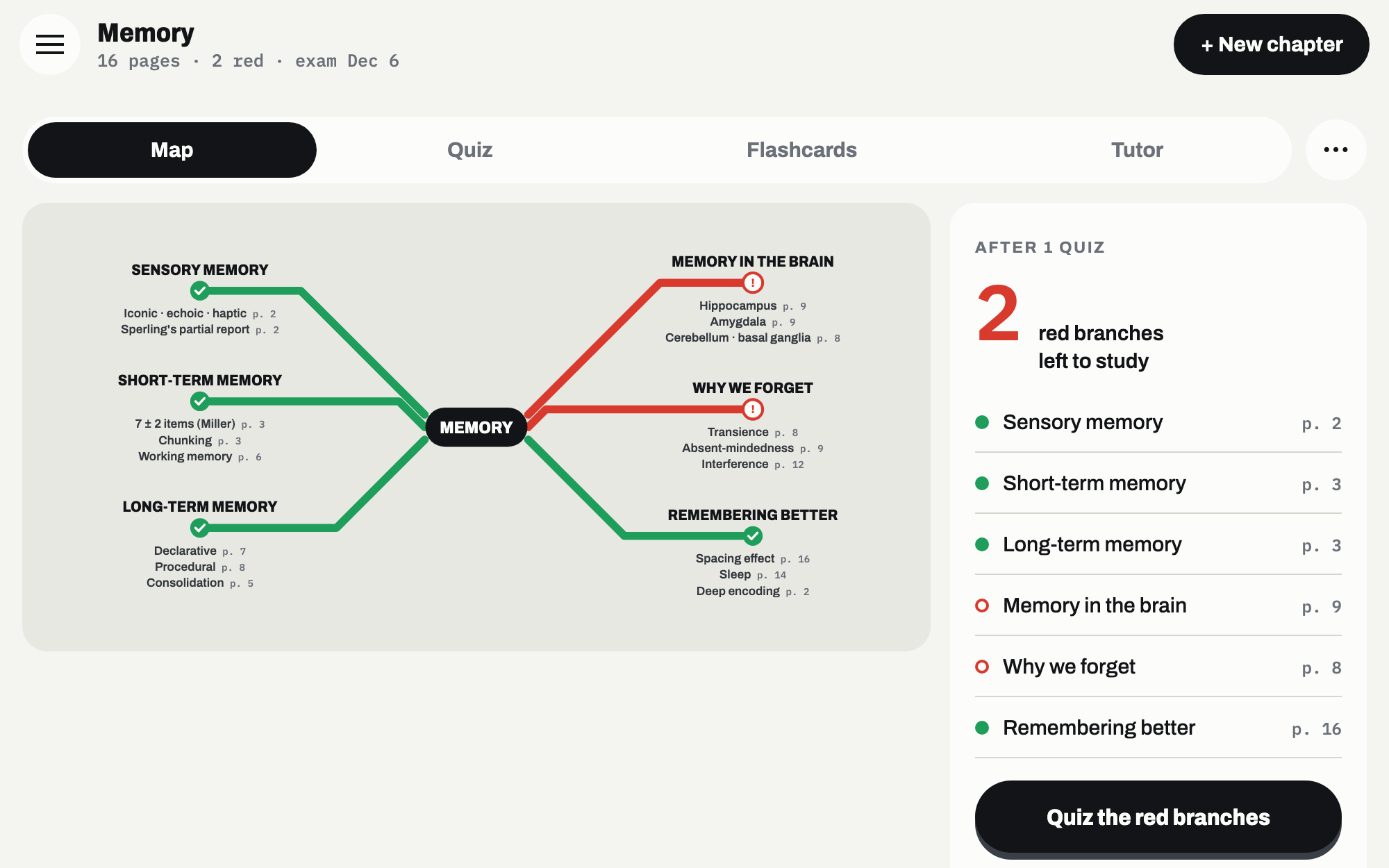
The Chapter Map app: a chapter on memory drawn as a subway map, two branches red, four green, and a side panel that says 2 red branches left to study
~30 sfrom your PDF to the whole chapter on one map
Or try the live demo first — no account
Works in your browser · laptop, tablet or phone · cancel anytime

You're not lazy. You're rereading.

You read the same page for the 30th time

It looks familiar, so it feels like you know it. Then the exam asks it a different way.

You paste the chapter into ChatGPT

You get a summary as long as the chapter, and it agrees with whatever you say.

You study for hours and nothing shows

Every line is highlighted, and you still can't tell what you know.

What changes the night before the exam

You stop starting at page 1

Your session starts with "4 red branches", not the whole chapter again.

You walk in knowing what you know

Not hoping. You've seen which parts are green.

You stop feeling stupid for studying hours

Now you can see what you did learn.

You can finally show you studied

One page, mostly green.

Why the 30th read didn't work

Familiar is not the same as known.

Rereading makes a page look familiar, and familiar feels like knowing — until the exam asks it a different way. Researchers who compared study techniques rated rereading and highlighting low-utility and practice testing high-utility (Dunlosky et al., 2013). Testing yourself beats reading again (Roediger & Karpicke, 2006).

The catch: self-testing is a pain. You'd have to see the whole chapter, write the questions, grade yourself and track what you missed. Nobody does that at 1 a.m. Chapter Map does the boring part.

The Red-Branch Loop

1MAP

Upload the PDF. In about 30 seconds the whole chapter is one editable page: branches for the main ideas, leaves for the details, and every node links to its page.

2QUIZ

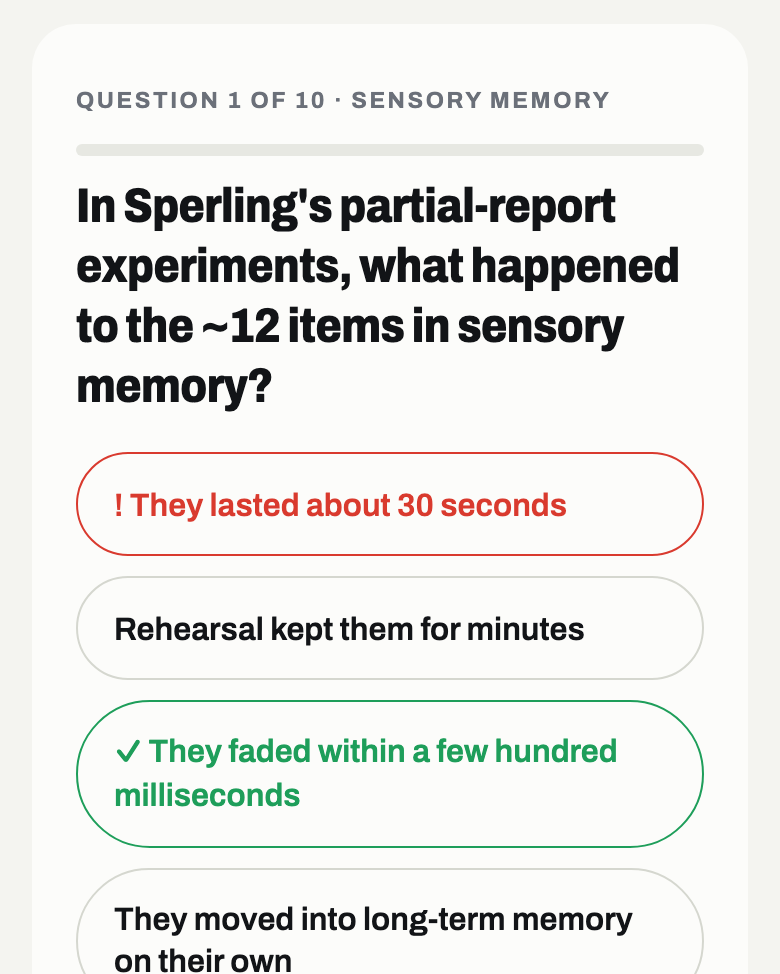
10 questions on that map, one branch at a time. Every answer is explained with its page number.

3RED BRANCHES

Each branch turns green or red with your answers. You review only the red, and the next quiz insists there.

If a branch stays red after two quizzes, the app splits it into smaller branches and asks again from the simplest one. Red never stays "study more."

Live demo · no account

Try it on a real reading. Watch the branches turn.

This is the map of a 16-page reading on memory. Answer 5 questions and each branch turns green or red. Tap any station to see its page.

Reading: Wikipedia, “Memory” (rev. 1386991444), CC BY-SA 4.0, selected sections. Download the PDF · Open the demo full screen

Three steps, tonight

1UPLOAD

Drop in tonight's chapter

A PDF, your professor's slides, or phone photos of the book. About 30 seconds later it's one page.

2QUIZ

Take the 10-question quiz

Optional timer. Every answer shows the page it came from, so you know it's from your material.

3STUDY THE RED

Review only what you missed

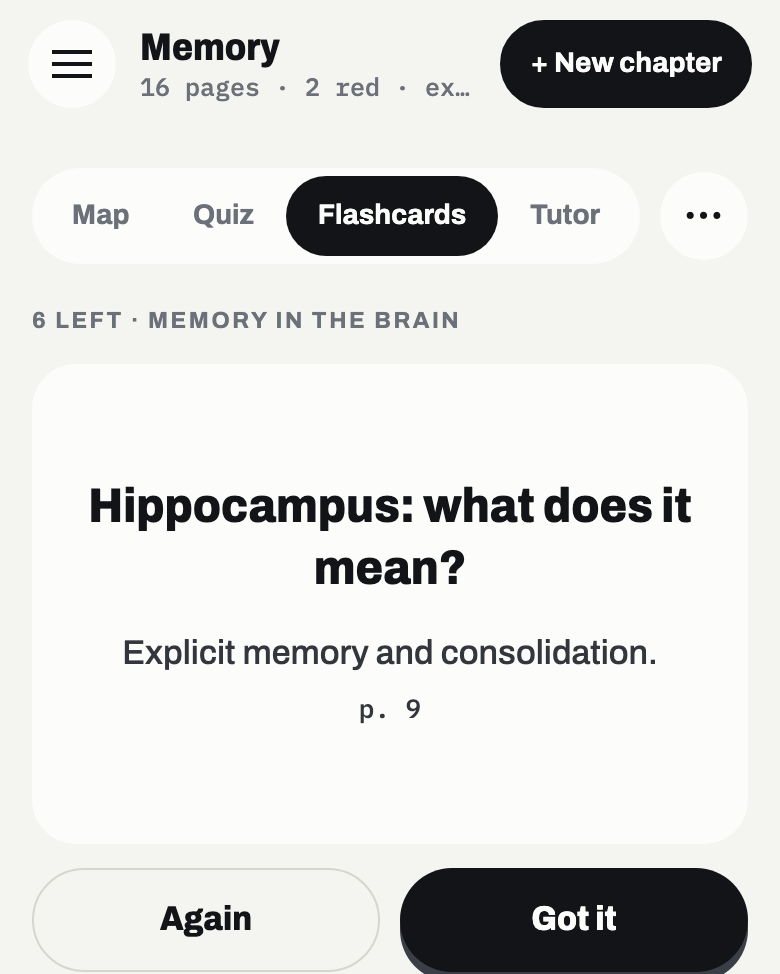
Flashcards built from your red branches, spaced to your exam date.

Not another AI chat. Not another flashcard app.

Rereading and highlighting

The page feels familiar, so you think you know it. It never asks you anything.

ChatGPT and Gemini

A wall of text that agrees with you, and never tells you what you don't know yet.

Flashcard apps

Great for single facts, but you write the cards yourself and never see how the chapter fits.

Mind-map tools

They draw the map and stop there. No quiz on it, no record of what you got wrong.

Chapter Map

The chapter on one page, a quiz on that page, and green and red that tell you exactly what to study next.

Everything in your plan

Monthly or yearly, you get all of it.

THE CHAPTER MAP

Your chapter on one page

  • Up to ~40 pages → one editable map in about 30 s
  • Every node opens its page
  • Drag, rename, delete, add branches
  • Download as PDF or PNG
Like Mapify Basic: $9.99/mo
MAP QUIZ + FLASHCARDS

Know what you know

  • 10 questions per chapter, branch by branch
  • The map turns green and red as you answer
  • Flashcards only from your red branches, spaced to your exam date
  • Export to Anki or Quizlet (CSV)
Like Quizlet Plus: $7.99/mo
THE PAGE TUTOR

Answers only from your pages

  • Ask anything about your chapter
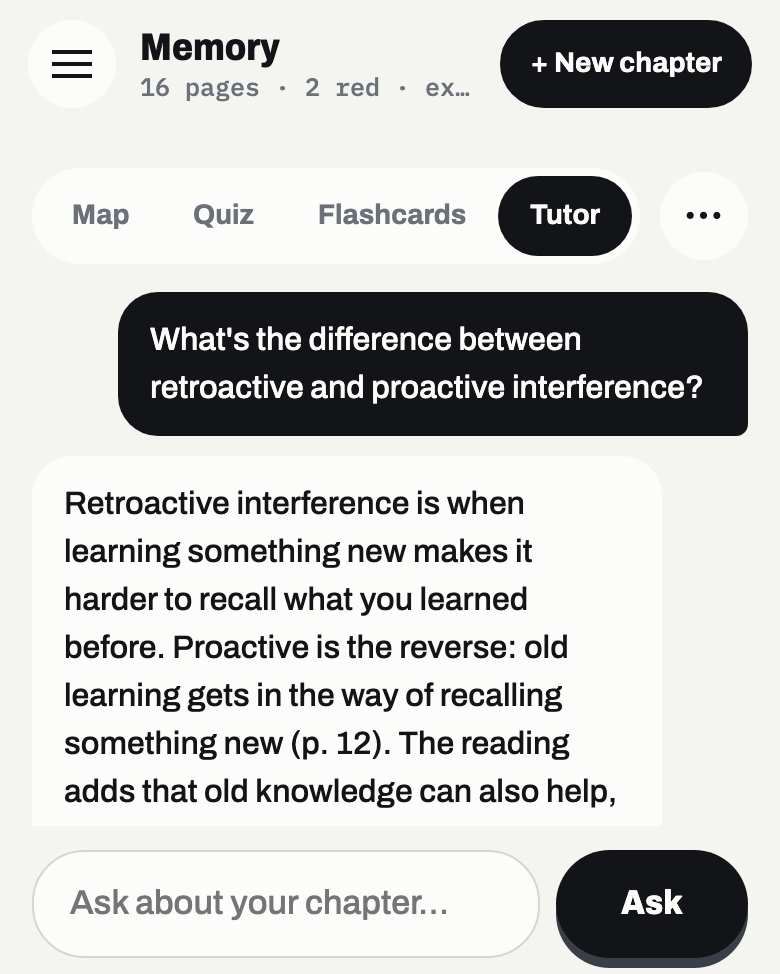
  • Every answer shows its page number
  • Says "not in your material" instead of making it up
  • "Explain this red branch simpler" on every red node
Like ChatGPT Plus: $20/mo
GIFT · PHOTO & SLIDES

Not a clean PDF? Fine.

  • Phone photos of a printed book
  • Your professor's PowerPoint or Word files
  • Each photo counts as one page
Like Adobe Scan Premium: $9.99/mo
Bought one by one: $47.97 a month
In Chapter Map: from $7.42 a month

Real screens from the app

A quiz question about retroactive interference, with the answer and its page number
The quiz, with the page of every answer
Flashcards built from the red branches, with the exam date
Flashcards of only what you missed
The tutor answering from the chapter, citing pages
The tutor that cites your pages

Start tonight. Founding price, locked for life.

As long as your subscription stays active, your price never goes up — not next semester, not next year.

Everything included is worth $47.97/mo · today from $17.99 — 62% less
Best for the school year

Yearly

$89 / year
= $7.42 a month
Save $126.88 a year · 59% off monthly
  • The Chapter Map
  • Map Quiz + Red-Branch Flashcards
  • The Page Tutor
  • Photo & Slides Import
Month to month

Monthly

$17.99 / month
cancel anytime
  • The Chapter Map
  • Map Quiz + Red-Branch Flashcards
  • The Page Tutor
  • Photo & Slides Import

Both plans: 500 pages and 150 tutor questions a month. Re-quizzing a chapter you already uploaded doesn't use pages. 7-day refund, even if you used it.

Chapter Map is a Metodia app · Secure checkout
7DAYS

The "Even If You Used It" Guarantee

Upload your next chapter. If the map and the quiz don't show you what you know and what you don't, email us within 7 days of your first payment and we refund it in full — even if you used every page. One email, no form, no questions about why.

Questions

Is there a free trial?

No free trial — but you don't have to buy blind. Try the live demo on this page: a real 16-page reading on memory, already mapped, with a 5-question quiz you can take right now. And if your own first chapter doesn't work for you, the 7-day "Even If You Used It" guarantee refunds your first payment in full.

NotebookLM and ChatGPT are free. Why pay?

They'll summarize your chapter or draw a map you can look at. Chapter Map turns that map into a quiz, colors each branch green or red by your answers, builds flashcards from what you missed, and keeps track until the exam. The tutor answers only from your pages, with the page number, and tells you when something isn't in your material.

Will it work for my class?

It works best with reading-heavy chapters: biology, psychology, anatomy, history, economics, nursing prerequisites, business. It maps concepts; it doesn't solve math problem sets step by step. The demo shows you exactly what you'll get.

My material is slides and photos of a printed book, not a PDF.

Upload them anyway. Photo & Slides Import reads phone photos, PowerPoint and Word. Each photo counts as one page.

What counts as a page? What if I hit the limit?

Every PDF page or photo you upload counts once. You get 500 a month (about 12 chapters) and 150 tutor questions. Re-quizzing a chapter you already uploaded is free. If you hit the limit, everything you made stays usable; new uploads open again at your next billing date.

Is it a subscription? Can I cancel?

Yes, monthly or yearly. Cancel anytime from "My account" in two clicks; you keep access until the end of the period you paid for. After the first 7 days there are no partial refunds.

If I cancel, do I lose my maps?

Download them anytime: maps as PDF or PNG, flashcards as CSV for Anki or Quizlet. They're yours.

Is my material private? Do you train AI on it?

Your files are only used to build your study sets. We keep the text of your pages, not the files. We don't sell them and we don't use them to train AI models. Delete any chapter, or your whole account, from "My account".

Is this cheating?

No. It studies YOUR course material with you and quizzes you on it. It doesn't write essays or do assignments.

When do I get access?

Right after payment: you create your password and you're in the app.

Does the price go up?

Not for you. Founding members keep their price as long as the subscription stays active.
Finals don't move.

Upload tonight's chapter and know your red branches before the exam — not after.

Chapter Map is a Metodia app · Secure checkout